[](https://github.com/tecolicom/App-mdee/actions?workflow=test) [](https://metacpan.org/release/App-mdee)
# NAME
mdee - em·dee, Markdown Easy on the Eyes
# SYNOPSIS
mdee [ options ] file ...
-h --help show help
--version show version
-d --debug debug level (repeatable)
-x --[no-]trace trace mode (set -x)
-n --dryrun dry-run mode
-s --style=# output style (nup/pager/cat/filter/raw)
-f --filter shortcut for --style=filter
-p --plain shortcut for --style=pager
--[no-]fold line folding (default: on)
--[no-]table table formatting (default: on)
--[no-]nup nup paged output (default: on)
--[no-]rule use Unicode rules for tables (default: on)
-w --width=# fold width (default: 80)
-t --theme=#[,#,...] color theme(s) (default: hashed)
-m --mode=# light or dark (default: light)
-B --base-color=# override base color of theme
(e.g., Ivory, #780043, (120,0,67))
--cm --colormap=L=SPEC override color for element (e.g., h1=RD)
--hm --heading-markup=# enable markup in headings (all/bold/...)
--show=# set field visibility (e.g., italic=1)
-C --pane=# number of columns
-R --row=# number of rows
-G --grid=# grid layout (e.g., 2x3)
-P --page=# page height in lines
-S --pane-width=# pane width (default: 85)
--bs --border-style=# border style
--[no-]pager[=#] pager command
# VERSION
Version 0.19
# DESCRIPTION
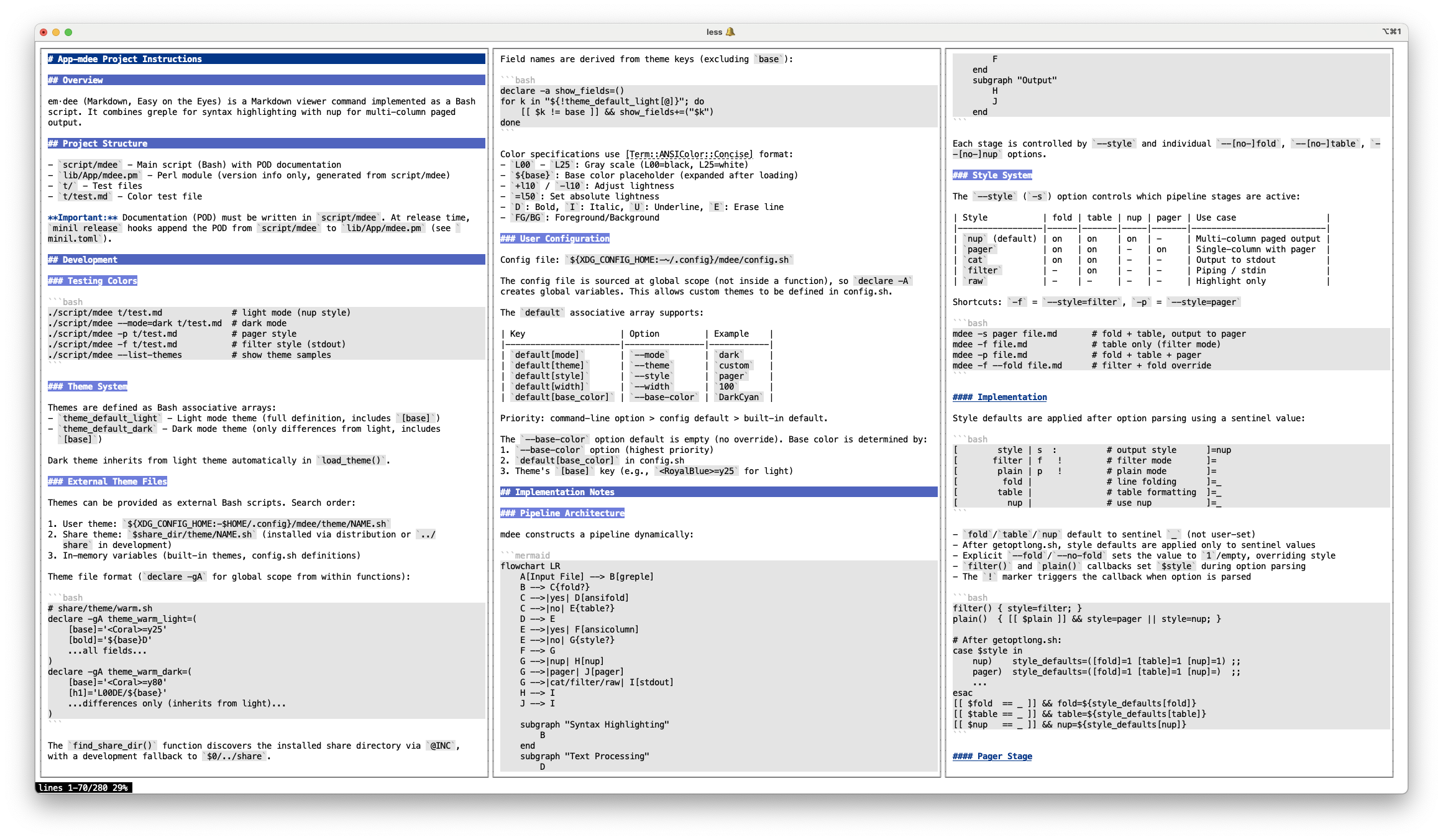
**em·dee** (command: `mdee`) is a terminal-based multi-column
Markdown text viewer with syntax highlighting, particularly
useful for reading documents generated by LLMs.
It displays Markdown text as-is with minimal formatting: syntax
highlighting, line folding for long list items, and table column
alignment. Markup characters (`**`, `` ` ``, `#`, etc.) are
preserved in the output. By default, closing hashes are appended
to h3-h6 headers (via the built-in `hashed` theme) to make
heading levels visually distinct. Link URLs are removed from the
display, showing only the link text (e.g., `[text](url)` becomes
`[text]`). On terminals supporting OSC 8 hyperlinks, the link
text remains clickable.
It does not render Markdown into formatted output or reflow
paragraphs. For full Markdown rendering, many other viewers are
available. Combine them with [nup(1)](https://metacpan.org/pod/App%3A%3Anup) for similar paged output
(e.g., `nup glow README.md`).
The pipeline combines [greple(1)](https://metacpan.org/pod/App%3A%3AGreple) for colorization and
[nup(1)](https://metacpan.org/pod/App%3A%3Anup) for multi-column paged output.
Supported elements: headers (h1-h6), bold, italic, strikethrough,
inline code, code blocks, HTML comments, tables, and list items.
## Multi-column Layout and Pagination
By default, **mdee** calculates the number of display columns by
dividing the terminal width by the pane width (default 85
characters). This determines how the output is laid out and
paginated.
When two or more columns fit, [nup(1)](https://metacpan.org/pod/App%3A%3Anup) arranges output
in multi-column layout with page-by-page pagination — content is
split into terminal-height pages viewed through a pager.
When only one column fits, **mdee** still uses nup for formatting
(borders, document layout) but disables page-by-page splitting,
so the content scrolls continuously in the pager. This avoids
wasted space from page breaks on narrow terminals while
maintaining the same visual appearance.
To force page-by-page pagination even in single-column layout,
specify `--nup` explicitly. The `--pane-width` (`-S`) option
adjusts the column width used for this calculation, and
`--pane` (`-C`) sets the number of columns directly.
Use `-p` (`--style=pager`) for a simpler view without nup
formatting — highlighted output is piped directly through a
pager. Use `-f` (`--style=filter`) to write highlighted
output to stdout without a pager, suitable for piping into
other commands.
# INSTALLATION
## Homebrew
Use [tecolicom/tap](https://github.com/tecolicom/homebrew-tap):
brew tap tecolicom/tap
brew install app-mdee
## CPAN
cpanm -n App::mdee
# OPTIONS
## General Options
- **-h**, **--help**
Show help message.
- **--version**
Show version.
- **-d**, **--debug**
Set debug level. Can be repeated for increasing verbosity.
- `-d`
Show theme values (`theme_light[]`/`theme_dark[]`, `md_config[]`)
and pipeline stage names.
- `-dd`
Above, plus full command lines for each pipeline stage.
- **-x**, **--trace**, **--no-trace**
Enable or disable shell trace mode (`set -x`). Useful for
debugging script execution. Can be toggled: `-x --no-x` enables
then disables tracing.
- **-n**, **--dryrun**
Dry-run mode. Show the pipeline without executing.
With `-dd`, shows expanded command lines for each stage instead
of function names.
## Processing Options
- **-s** _STYLE_, **--style**=_STYLE_
Set the output style. Default is `nup`. Available styles:
- `nup` - Full pipeline: fold + table + nup paged output (default)
- `pager` - Fold + table, output to pager (`$PAGER` or `less`)
- `cat` - Fold + table, output to stdout
- `filter` - Table only (no fold, no nup), suitable for piping
- `raw` - Highlight only (no fold, no table, no nup)
The style sets the initial state of `--fold`, `--table`, and
`--nup` options. Subsequent options can override individual
settings:
mdee -s filter --fold file.md # filter + fold
mdee -p --no-fold file.md # pager without fold
- **-f**, **--filter**
Shortcut for `--style=filter`. Reads from stdin (or files) and
outputs highlighted Markdown to stdout. Disables line folding and
nup paged output, but keeps table formatting enabled. Useful for
piping Markdown content through mdee for syntax highlighting.
- **-p**, **--plain**
Shortcut for `--style=pager`. Enables fold and table formatting,
outputs through a pager (`$PAGER` or `less`) instead of nup.
- **--\[no-\]fold**
Enable or disable line folding for list items. When enabled, long
lines in list items are wrapped with proper indentation using
[ansifold(1)](https://metacpan.org/pod/App%3A%3Aansifold). Default is enabled.
Supported list markers: `*`, `-`, `1.`, `1)`, `#.`, `#)`.
The `#.` and `#)` forms are Pandoc's auto-numbered list syntax.
- **--\[no-\]table**
Enable or disable table formatting. When enabled, Markdown tables
are formatted using [ansicolumn(1)](https://metacpan.org/pod/App%3A%3Aansicolumn) for aligned column display.
Default is enabled.
- **--\[no-\]nup**
Enable or disable [nup(1)](https://metacpan.org/pod/App%3A%3Anup) for multi-column paged output.
When disabled, output goes directly to stdout without formatting.
Default is enabled. When explicitly specified, forces nup's
native pagination even in single-column layout (which normally
uses the pager instead).
- **--\[no-\]rule**
Enable or disable Unicode rule characters for table borders.
When enabled, ASCII pipe characters (`|`) are replaced with
Unicode box-drawing characters (`│`, `├`, `┤`, `┼`) and
dashes (`-`) in separator lines are replaced with horizontal
rules (`─`). Default is enabled.
- **-w** _N_, **--width**=_N_
Set the fold width for text wrapping. Default is calculated from
`--pane-width` minus 5 (margin for borders and padding), which
gives 80 when pane-width is 85. Only effective when `--fold` is
enabled.
## Theme Options
**em·dee** supports color themes for customizing syntax highlighting.
Themes define colors for various Markdown elements (headers, code blocks,
bold text, etc.).
- **-t** _NAME_, **--theme**=_NAME_\[,_NAME_,...\]
Select color themes. The default is `hashed`, which appends
closing hashes to h3-h6 headers.
Themes specified with `--theme` are added to the default, not
replacing it. Multiple themes can be specified as comma-separated
names or by repeating the option. Each theme is applied in order
as a transformation:
mdee --theme=warm file.md # hashed (default) + warm
mdee --theme=warm,hashed file.md # same (hashed already in default)
mdee --no-theme --theme=warm # warm only (clear default first)
mdee --no-theme file.md # no theme
Use `--no-theme` to clear the default theme. It can be combined
with `--theme` to start fresh.
Theme files are searched in the following order:
- 1. User theme directory: `${XDG_CONFIG_HOME:-~/.config}/mdee/theme/NAME.sh`
- 2. Share theme directory: installed with the distribution under `auto/share/dist/App-mdee/theme/`
Theme files are Bash scripts that can modify `theme_light[base]`,
`theme_dark[base]`, and/or `md_config[]`:
# theme/warm.sh — change base color
theme_light[base]='=y25'
theme_dark[base]='=y80'
# theme/hashed.sh — enable closing hashes on h3-h6
md_config+=(hashed.h3=1 hashed.h4=1 hashed.h5=1 hashed.h6=1)
Use `-d` to dump current theme values in sourceable format.
- **-m** _MODE_, **--mode**=_MODE_
Select light or dark mode. Default is `light`.
If the terminal supports background color detection (via
[Getopt::EX::termcolor](https://metacpan.org/pod/Getopt%3A%3AEX%3A%3Atermcolor)), the mode is automatically selected based on
terminal luminance.
Each theme has light and dark variants optimized for different terminal
backgrounds. The built-in `default` theme uses RoyalBlue as the base
color with automatic luminance adjustment:
- `light` - RoyalBlue with luminance 25 (dark text for light backgrounds)
- `dark` - RoyalBlue with luminance 80 (bright text for dark backgrounds)
- **-B** _COLOR_, **--base-color**=_COLOR_
Override the theme's base color. The base color determines the overall
color scheme because all heading colors (h1, h2, h3, etc.) are derived
from it by adjusting luminance. For example, h2 might be `${base}+y20`
(base color with luminance increased by 20).
**Simple color name** - luminance is adjusted automatically:
When you specify just a color name (without `<>` brackets or
other syntax), the default luminance adjustment is applied based on
the current mode:
-B RoyalBlue # becomes =y25 in light mode
# becomes =y80 in dark mode
This makes it easy to try different colors without worrying about
luminance values. The default adjustments (`=y25` for light, `=y80`
for dark) are designed to provide good contrast against typical terminal
backgrounds.
**Full color specification** - used exactly as specified:
If you include `<>` brackets, luminance modifiers, or use RGB
notation, the value is used as-is without any automatic adjustment:
-B '' # original color, no adjustment
-B '=y50' # explicit luminance 50
-B '#780043' # burgundy in hex
-B '(120,0,67)' # same color in RGB decimal
**Customizing the default adjustment**:
The automatic luminance adjustment values can be customized with the
`--adjust` option:
--adjust light='=y30' # use =y30 instead of =y25 for light mode
--adjust dark='=y70' # use =y70 instead of =y80 for dark mode
**Note**: Basic ANSI color codes (`R`, `G`, `B`, etc.) cannot be used
because heading variations require luminance adjustment, which only works
with full color specifications (X11 names, RGB hex, or RGB decimal).
## Highlight Options
- **--colormap**=_LABEL_=_SPEC_, **--cm**=_LABEL_=_SPEC_
Override the color for a specific element. _LABEL_ is one of the
color labels listed below. _SPEC_ follows
[Term::ANSIColor::Concise](https://metacpan.org/pod/Term%3A%3AANSIColor%3A%3AConcise) format.
--colormap h1=RD # red bold headings
--colormap code_block=/L20;E # dark background for code blocks
--colormap bold='${base}D' # base color bold
Available labels:
h1 - h6 Heading levels 1 through 6
bold Bold (**text** or __text__)
italic Italic (*text* or _text_)
strike Strikethrough (~~text~~)
link Inline links [text](url)
image Images 
image_link Image links [](url)
blockquote Blockquote marker (>)
horizontal_rule Horizontal rules (---, ***, ___)
comment HTML comments ()
code_mark Code delimiters (fences and backticks)
code_info Fenced code block info string
code_block Fenced code block body
code_inline Inline code body
This option can be specified multiple times.
- **--heading-markup**=_STEPS_, **--hm** _STEPS_
Control inline markup processing inside headings. By default,
headings are rendered with uniform heading color without processing
bold, italic, strikethrough, or inline code inside them. Links
are always processed as OSC 8 hyperlinks regardless of this option.
Use `all` or `1` to enable all inline formatting within headings
using cumulative coloring. To select specific steps, list them
separated by colons.
Available steps: `inline_code`, `horizontal_rules`, `bold`,
`italic`, `strike`.
mdee --hm all file.md # all markup
mdee --hm bold file.md # bold only
mdee --hm bold:italic file.md # bold and italic
- **--show**=_FIELD_\[=_VALUE_\],...
Control field visibility for highlighting. Empty value or `0` disables
the field; any other value (including `1`) enables it.
--show italic # enable italic
--show bold=0 # disable bold
--show all # enable all fields
--show all= --show bold # disable all, then enable only bold
Multiple fields can be specified with commas or by repeating the option.
The special field `all` affects all fields and is processed first.
Available fields: `comment`, `bold`, `italic`, `strike`, `h1`,
`h2`, `h3`, `h4`, `h5`, `h6`, `code_mark`, `code_info`, `code_block`,
`code_inline`, `link`, `image`, `image_link`.
All fields are enabled by default.
## Layout Options (passed to nup)
- **-C** _N_, **--pane**=_N_
Set the number of columns (panes). When not specified (or 0),
the number of columns is calculated from the terminal width and
`--pane-width`. If only 1 column fits, nup formatting (borders
etc.) is preserved but pagination is handled by the pager instead.
Use `--nup` to force nup's native pagination even in single column.
- **-R** _N_, **--row**=_N_
Set the number of rows.
- **-G** _CxR_, **--grid**=_CxR_
Set grid layout. For example, `-G2x3` creates 2 columns and 3 rows.
- **-P** _N_, **--page**=_N_
Set the page height in lines.
- **-S** _N_, **--pane-width**=_N_
Set the pane width in characters. Default is 85. This value is
used to calculate the number of columns and the default fold
width.
- **--bs**=_STYLE_, **--border-style**=_STYLE_
Set the border style.
## Pager Options
- **--\[no-\]pager**\[=_COMMAND_\]
Set the pager command. Use `--pager=less` to specify a pager,
or `--no-pager` to disable paging.
# CONFIGURATION
User configuration is loaded from:
${XDG_CONFIG_HOME:-~/.config}/mdee/config.sh
This is a shell script that can set defaults and override colors:
# ~/.config/mdee/config.sh
default[mode]='dark' # set default mode
default[theme]='warm' # set default theme(s)
default[style]='pager' # set default style
default[width]=100 # set default fold width
default[base_color]='DarkCyan' # set default base color
The `default` associative array supports the following keys:
- `default[mode]` - Corresponds to `--mode` (e.g., `dark`, `light`)
- `default[theme]` - Corresponds to `--theme` (e.g., `warm`, `warm,hashed`)
- `default[style]` - Corresponds to `--style` (e.g., `pager`, `cat`)
- `default[width]` - Corresponds to `--width` (e.g., `100`)
- `default[pane_width]` - Corresponds to `--pane-width` (e.g., `100`)
- `default[pane]` - Corresponds to `--pane` (e.g., `2`)
- `default[base_color]` - Corresponds to `--base-color` (e.g., `DarkCyan`)
**Overriding theme colors**
Config.sh can modify theme variables directly, using the same
mechanism as theme files:
# Change base color for both modes
theme_light[base]='=y25'
theme_dark[base]='=y80'
# Enable md module features
md_config+=(hashed.h3=1 hashed.h4=1 hashed.h5=1 hashed.h6=1)
Changing the base color automatically affects all derived colors
(h1, h2, bold, etc.) because the md module expands `${base}`
references.
Use `-d` to dump current theme values in sourceable format.
**Color specification format**
Color specifications use [Term::ANSIColor::Concise](https://metacpan.org/pod/Term%3A%3AANSIColor%3A%3AConcise) format.
The `FG/BG` notation specifies foreground and background colors
(e.g., `L25D/${base};E` means gray foreground on base-colored background).
The `${base}` string is expanded to the base color value after loading.
# EXAMPLES
mdee README.md # view markdown file
mdee -C2 document.md # 2-column view
mdee -G2x2 manual.md # 2x2 grid (4-up)
mdee -w60 narrow.md # narrower text width
mdee --no-pager file.md # without pager
mdee --no-nup file.md # output to stdout without nup
mdee --no-fold file.md # disable line folding
mdee --no-table file.md # disable table formatting
# Output styles
mdee -s pager file.md # fold + table, output to pager
mdee -s cat file.md # fold + table, output to stdout
mdee -s filter file.md # table only, no fold/nup
mdee -s raw file.md # highlight only
# Style shortcuts
mdee -p file.md # same as --style=pager
cat file.md | mdee -f # highlight stdin (filter mode)
mdee -f file.md # highlight only (no paging)
# Override individual settings
mdee -f --fold file.md # filter + fold
mdee -p --no-fold file.md # pager without fold
# Theme examples
mdee --mode=dark file.md # use dark mode
mdee --mode=light file.md # use light mode
mdee -B Ivory file.md # override base color
mdee --mode=dark -B '#780043' file.md # dark mode with burgundy
mdee --theme=warm file.md # warm (Coral) base color
mdee --theme=warm,hashed file.md # warm + closing hashes
# DEPENDENCIES
This command requires the following:
- [App::Greple](https://metacpan.org/pod/App%3A%3AGreple) - pattern matching and highlighting
- [App::Greple::tee](https://metacpan.org/pod/App%3A%3AGreple%3A%3Atee) - filter integration
- [App::ansifold](https://metacpan.org/pod/App%3A%3Aansifold) - ANSI-aware text folding
- [App::ansicolumn](https://metacpan.org/pod/App%3A%3Aansicolumn) - ANSI-aware column formatting
- [App::nup](https://metacpan.org/pod/App%3A%3Anup) - N-up multi-column paged output
- [App::ansiecho](https://metacpan.org/pod/App%3A%3Aansiecho) - ANSI color output
- [Getopt::Long::Bash](https://metacpan.org/pod/Getopt%3A%3ALong%3A%3ABash) - bash option parsing
- [Getopt::EX::termcolor](https://metacpan.org/pod/Getopt%3A%3AEX%3A%3Atermcolor) - terminal background detection
# IMPLEMENTATION
**em·dee** is implemented as a Bash script that orchestrates multiple
specialized tools into a unified pipeline. The architecture follows
Unix philosophy: each tool does one thing well, and they communicate
through standard streams.
The overall data flow is:
Input File
|
v
[greple -Mmd] --- Syntax Highlighting + Table Formatting + Text Folding
|
v
[nup] --- Paged Output (nup style)
| or
[pager] --- Pager Output (pager style)
|
v
Terminal
## Pipeline Architecture
**em·dee** dynamically constructs a pipeline based on enabled options.
Each stage is defined as a Bash function (e.g., `run_greple`,
`run_nup`). The `--dryrun` option displays the function-based
pipeline without execution.
### Processing Stages
The pipeline consists of configurable stages. Processing options
can be enabled or disabled independently using `--[no-]fold`,
`--[no-]table`, and `--[no-]nup` options.
#### Syntax Highlighting
The first stage uses [greple(1)](https://metacpan.org/pod/App%3A%3AGreple) with the `--filter`
option, which sets `--all --need=0 --exit=0` to run as a filter
without requiring pattern arguments. Syntax highlighting is handled
entirely by the `-Mmd` module.
Supported Markdown elements:
- Headers (`# h1` through `###### h6`)
- Bold text (`**bold**` or `__bold__`)
- Italic text (`*italic*` or `_italic_`)
- Inline code (`` `code` ``)
- Code blocks (fenced with ```` ``` ```` or `~~~`)
- HTML comments (``)
Code block detection follows the CommonMark specification:
- Opening fence: 0-3 spaces indentation, then 3+ backticks or tildes
- Closing fence: 0-3 spaces indentation, same character, same or more count
- Backticks and tildes cannot be mixed (```` ``` ```` must close with ```` ``` ````)
#### Text Folding
Text folding is handled within the [App::Greple::md](https://metacpan.org/pod/App%3A%3AGreple%3A%3Amd) module
using [Greple::tee](https://metacpan.org/pod/Greple%3A%3Atee) to pipe matched regions through
[ansifold(1)](https://metacpan.org/pod/App%3A%3Aansifold). It preserves ANSI escape sequences
and maintains proper indentation for nested lists. Code blocks,
HTML comments, and tables are excluded from folding.
Recognized list markers include `*`, `-`, `1.`, `1)`, `#.`,
and `#)`. The `#` marker is Pandoc's auto-numbered list syntax.
The folding width is controlled by `--width` option (default: 80).
#### Table Formatting
Table formatting is handled within the [App::Greple::md](https://metacpan.org/pod/App%3A%3AGreple%3A%3Amd) module
(after syntax highlighting, before output). Markdown tables are
detected by the pattern `^ {0,3}(\|.+\|\n){3,}` and formatted with
aligned columns using [ansicolumn(1)](https://metacpan.org/pod/App%3A%3Aansicolumn) while
preserving ANSI colors. When `--rule` is enabled (default),
ASCII pipe characters are replaced with Unicode box-drawing
characters (`│`, `├`, `┤`, `┼`, `─`).
### Output Stage
The final stage uses [nup(1)](https://metacpan.org/pod/App%3A%3Anup) to provide multi-column paged output.
Layout options (`--pane`, `--row`, `--grid`, `--page`) are passed
directly to nup.
## Theme System
**em·dee** implements a theme system where themes are transformations
applied to the built-in default theme. Multiple themes can be
chained via `--theme=NAME1,NAME2,...`.
### Theme Structure
Color definitions are managed by the [App::Greple::md](https://metacpan.org/pod/App%3A%3AGreple%3A%3Amd) module.
The `theme_light` and `theme_dark` arrays contain only the base
color. Theme files can modify the base color and pass configuration
to the md module via `md_config[]`:
# theme/warm.sh — change base color
theme_light[base]='=y25'
theme_dark[base]='=y80'
# theme/hashed.sh — enable closing hashes
md_config+=(hashed.h3=1 hashed.h4=1 hashed.h5=1 hashed.h6=1)
The `md_config[]` entries are passed as config parameters to the
[App::Greple::md](https://metacpan.org/pod/App%3A%3AGreple%3A%3Amd) module.
#### Base Color Expansion
The `${base}` placeholder in color values is expanded by the md
module. The base color is determined by `--base-color` option
(default: RoyalBlue) with automatic luminance adjustment based on
mode (`=y25` for light, `=y80` for dark).
### Color Specifications
Colors are specified using [Term::ANSIColor::Concise](https://metacpan.org/pod/Term%3A%3AANSIColor%3A%3AConcise) format.
The `--colormap` (`--cm`) option maps colors to captured groups. For example,
`L00D/${base};E` specifies gray foreground on base-colored background.
The color specification supports modifiers:
- `+y10` / `-y10`: Adjust luminance by percentage
- `=y50`: Set absolute luminance
- `D`: Bold, `U`: Underline, `E`: Erase line
### Terminal Mode Detection
**em·dee** uses [Getopt::EX::termcolor](https://metacpan.org/pod/Getopt%3A%3AEX%3A%3Atermcolor) to detect terminal background
luminance. If luminance is below 50%, dark mode is automatically
selected.
# LIMITATIONS
## HTML Comments
Only HTML comments starting at the beginning of a line are highlighted.
Inline comments are not matched to avoid conflicts with inline code
containing comment-like text (e.g., `` `` ``).
## Emphasis
Emphasis patterns (bold and italic) do not span multiple lines.
Multi-line emphasis text is not supported.
## Links
Link patterns do not span multiple lines. The link text and URL must
be on the same line.
Links inside other highlighted elements (such as headings or bold
text) are not processed.
Reference-style links (`[text][ref]` with `[ref]: url` elsewhere)
are not supported.
## OSC 8 Hyperlinks
Links are converted to OSC 8 terminal hyperlinks for clickable URLs:
- `[text](url)` - `[text]` links to url
- `` - `![alt]` links to url (image)
- `[](url)` - `!` links to img, `[alt]` links to url
This requires terminal support. Compatible terminals include iTerm2,
Kitty, WezTerm, Ghostty, and recent versions of GNOME Terminal.
Apple's default Terminal.app does not support OSC 8.
When using `less` as pager, version 566 or later is required with
`-R` option.
For OSC 8 specification, see:
[https://gist.github.com/egmontkob/eb114294efbcd5adb1944c9f3cb5feda](https://gist.github.com/egmontkob/eb114294efbcd5adb1944c9f3cb5feda)
## Less Environment Variables
When `less` is used as pager (either directly via `--style=pager` or
through `nup`), the following environment variables affect behavior.
**mdee** sets defaults for these when they are not already defined:
- `LESS`
Default: `-R`. The `-R` option is required for ANSI color
sequences to be displayed correctly.
- `LESSANSIENDCHARS`
Default: `mK`. This tells `less` to recognize ANSI sequences
ending with `m` (SGR color) and `K` (erase line). The erase line
sequence is used for background color rendering.
If you already have these variables set in your environment, **mdee**
does not override them.
# SEE ALSO
[nup(1)](https://metacpan.org/pod/App%3A%3Anup), [greple(1)](https://metacpan.org/pod/App%3A%3AGreple), [ansifold(1)](https://metacpan.org/pod/App%3A%3Aansifold), [ansicolumn(1)](https://metacpan.org/pod/App%3A%3Aansicolumn)
# AUTHOR
Kazumasa Utashiro
# LICENSE
Copyright 2026 Kazumasa Utashiro.
This software is released under the MIT License.
[https://opensource.org/licenses/MIT](https://opensource.org/licenses/MIT)